Table of Contents
The Pattern Playwright Proved
If you've paired an LLM with a browser, you've probably used Playwright. And you've probably noticed what makes it click: the agent doesn't reason from a screenshot of your page — it reasons from the DOM tree, the network calls, the console output, and the accessibility roles, with pixels as one input among many.
That pattern — structured backstage data alongside the pixels — is the whole reason browser-based AI coding works. Without it, the agent OCRs button labels off a PNG and hallucinates half of them.
But Playwright's superpower stops at the browser tab.
What Falls Outside the Browser
Most of an AI-driven coding session doesn't happen in a browser. It happens in:
- Xcode debugging a Swift compile error
- Cursor or VS Code with a cursor in the middle of a function
- Terminal or Warp with scrollback the agent needs to see
- Finder with files the agent has to address by path
- Native dialogs, design tools, menu bars — the stuff Mac apps are made of
Drag a screenshot of any of those into Claude or ChatGPT and the agent is back to OCR-and-guess. No DOM. No console. No backstage data. Just pixels — which is what Playwright was invented to get away from.
Same Pattern, Different Surface
What an LLM receives in each case: same architecture, different surface — a browser tab on the left (via Playwright), a native Mac app on the right (via Stash). The structured payload extracted from each is what the agent grounds on.
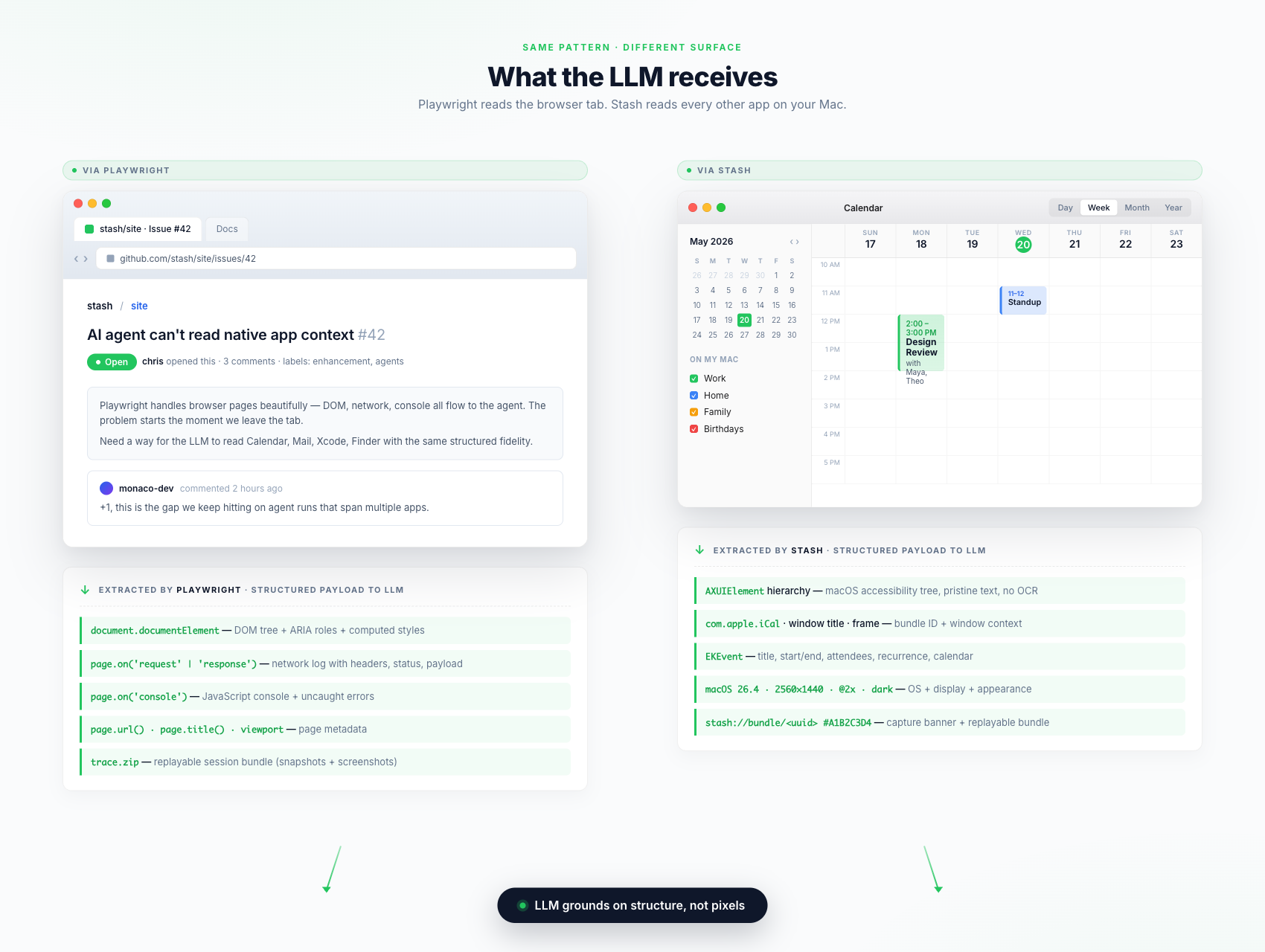
A side-by-side comparison of what reaches the agent in each case:
| What the agent sees | Browser tab (Playwright) | Vanilla screenshot | Mac app (Stash) |
|---|---|---|---|
| Pixels | ✅ | ✅ | ✅ |
| Structured UI tree | ✅ DOM + ARIA | ❌ | ✅ accessibility tree |
| Window / app identity | ✅ page metadata | ❌ guesses from icons | ✅ bundle ID, window title, OS |
| Behind-the-scenes events | ✅ network, console | ❌ | ✅ clipboard events, focus log |
| Cursor position / open file | ✅ via editor APIs | ❌ | ✅ file path, line, column |
| Replayable trace bundle | ✅ trace.zip | ❌ | ✅ Stash capture bundle |
| Queryable later | ✅ via Inspector | ❌ | ✅ via local MCP server |
What's in a Stash Capture
Every Stash screenshot ships with:
- An AI context banner baked into the image — app name, window title, URL, macOS version, 8-character capture ID
- XMP metadata inside the PNG carrying the same data structured for parsing
- An accessibility tree sidecar — pristine text of every UI element, no OCR
- A dev-context block for code editors — active file, cursor position, visible buffer, language
Every Stash recording produces something closer to a Playwright trace: a small bundle with report.md (the timeline), per-frame metadata, key-frame images, and an audio track. Clicks, scroll bursts, keyboard shortcuts, clipboard copies, app focus transitions, voice transcript — all structured, all timestamped, all replayable. Drop it into Claude Code and the agent walks the session frame by frame the way it walks a Playwright trace.
MCP Is the Inspector
Playwright has Inspector. Stash has a local MCP server. Claude Code, Cursor, and ChatGPT Desktop list your recent captures, search them, fetch a full dossier, or pull a video bundle — no upload, no copy-paste, no cloud round-trip.
You say "look at my last Stash capture." The agent reads the structured payload — banner data, accessibility tree, dev context — and reasons, not guesses.
Use Both
Stash is not a Playwright replacement. They cover different surfaces:
- Playwright owns the browser tab. Web app testing, agent flows on web UIs, anything that lives in Chromium / WebKit / Firefox.
- Stash owns everything outside the browser tab — Xcode, Terminal, your editor, your design tool, and the multi-app workflow in between.
If your AI coding work touches anything more than a browser — and most of it does — the gap Stash fills is the one Playwright stopped at.
Frequently Asked Questions
Is Stash a replacement for Playwright?
No. Playwright instruments browser pages; Stash instruments the rest of macOS. They cover non-overlapping surfaces, and a serious AI coding setup wants both.
Do I have to run the MCP server to get value?
No. Every Stash screenshot carries its context banner and metadata standalone — drop the PNG into any chat and the agent already sees app name, window title, URL, and OS version. MCP adds search, capture IDs, and the full accessibility tree on demand.
Does Stash work with Claude Code, Cursor, and ChatGPT Desktop?
Yes. The one-line installer at yourstash.ai/install auto-configures Claude Code, Claude Desktop, and Cursor. Other MCP-speaking clients work via manual config.
Does Stash send my screenshots to the cloud?
No. Clipboard history, screenshots, bookmarks, and the MCP server are local — they live in a SQLite database on your Mac. Videos upload only when you explicitly share them.
Is Stash an alternative to CleanShot X or Loom?
There is overlap, but the differentiator is the AI layer — the context banner, accessibility tree, dev context, and local MCP server. Neither CleanShot X nor Loom emits structured data an LLM can ground on.
Key Takeaways
- Playwright works because it gives the LLM structured backstage data, not just a screenshot of the page.
- That pattern stops at the browser tab. Native macOS apps fall back to OCR-and-guess.
- Stash applies the same pattern to native apps: AI context banners, accessibility tree, dev context, clipboard events, interaction timelines.
- A Stash video bundle is the macOS equivalent of a Playwright
trace.zip— readable, replayable, addressable. - A local MCP server is the macOS equivalent of Playwright Inspector — agents query captures by ID or by search.
- Use both. Playwright for the browser tab, Stash for everything else.